
GoDaddy DNS: how to add A, CNAME and TXT records, and change nameservers
To add a DNS record at GoDaddy, open your Domain Portfolio, select the domain, go to DNS and stay on the DNS Records tab. Click Add New Record, pick the Type, type only the subdomain part in Name (@ for the root domain), paste the Value, choose a TTL and click Save. This only works while the domain uses GoDaddy's nameservers.
I went through this on 16 September 2026 in a GoDaddy account and queried GoDaddy's nameservers directly to see what they actually serve. A few things came up that the help center doesn't spell out, or gets wrong:
- The help center says new records default to a 1 hour TTL. The form I opened preselected 1/2 Hour.
- There is no ALIAS or ANAME record type, so a root domain can only point at IP addresses.
- Turning on Forwarding locks your root A record, and GoDaddy's own docs say it moves the domain back to GoDaddy nameservers if it was using someone else's.
- A "doesn't exist" answer from GoDaddy's nameservers is cached for 10 minutes, not the hour you may have seen quoted.
All of it is below, with the commands to check it yourself.
Step 0: check which DNS the domain is using
The DNS Records tab only edits records that GoDaddy itself serves. GoDaddy's nameservers all end in domaincontrol.com, with a number in front:
dig +short NS example.com
ns27.domaincontrol.com.
ns28.domaincontrol.com.
The numbers vary by account (I saw ns27/ns28 on one domain and ns67/ns68 on another). Any pair ending in domaincontrol.com means GoDaddy DNS. If you see something else, say ada.ns.cloudflare.com, your records live at that provider, and adding them at GoDaddy changes nothing that anyone can see. The DNS provider lookup does the same check in a browser.
In the dashboard, the same answer is on the Nameservers tab next to DNS Records. A domain on GoDaddy DNS says Using default nameservers above the two domaincontrol.com names.
| Nameservers | Where your DNS records are edited |
|---|---|
nsXX.domaincontrol.com (GoDaddy default) | GoDaddy, DNS Records tab |
| Cloudflare, Vercel, your web host... | At that provider, not at GoDaddy |
What GoDaddy puts in a new zone
This is the DNS Records tab of a domain in the account, with the domain renamed:
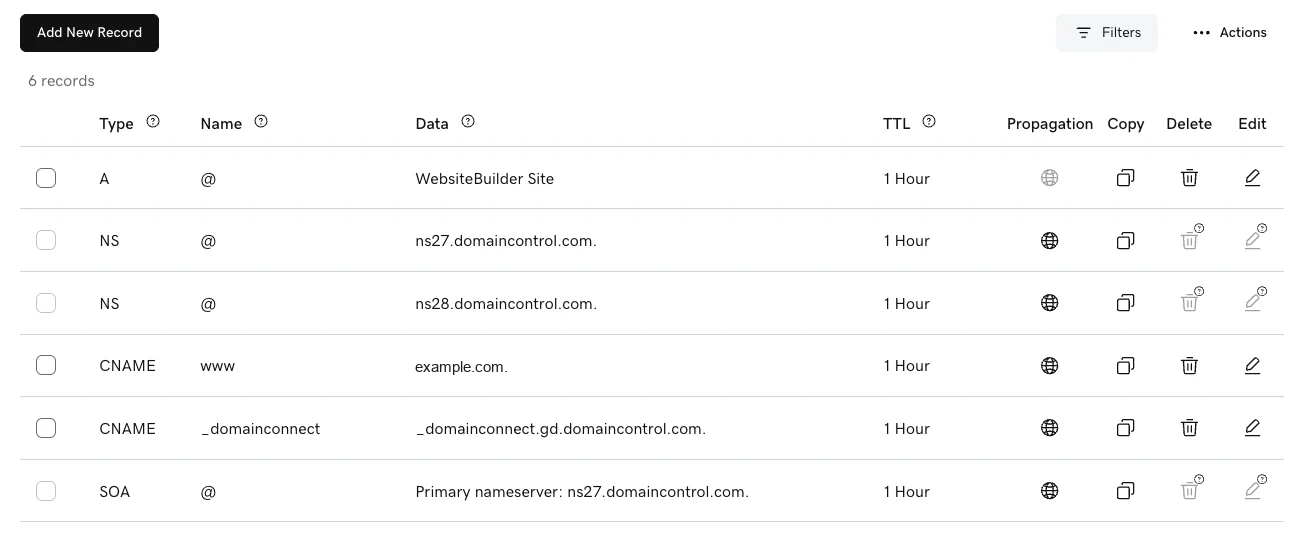
| Type | Name | Data shown | What it really is |
|---|---|---|---|
| A | @ | WebsiteBuilder Site | Two IP addresses (76.223.105.230, 13.248.243.5), both on AWS Global Accelerator |
| NS | @ | ns27.domaincontrol.com. | GoDaddy's nameserver. Can't be edited or deleted here |
| NS | @ | ns28.domaincontrol.com. | Same |
| CNAME | www | @ (shown as the domain) | www follows whatever the root points at |
| CNAME | _domainconnect | _domainconnect.gd.domaincontrol.com. | Domain Connect discovery, covered below |
| SOA | @ | Primary nameserver: ns27.domaincontrol.com. | Zone metadata. Can't be edited |
Two things to notice. The A record doesn't show an IP at all: the dashboard shows the name of the GoDaddy product the domain is attached to, and you only see the addresses by querying DNS. And the www CNAME already points at the root, so if you change the root's A record, www follows. If a service asks you to put a CNAME on www, you edit this existing row instead of adding a new one. GoDaddy's rules don't allow a record that duplicates an existing one, and a CNAME can't share its name with anything.
How to add a DNS record at GoDaddy, step by step
- Sign in and open your Domain Portfolio.
- Select the domain to open its settings, then open DNS. You land on the DNS Records tab.
- Click Add New Record. A New Records panel opens above the table.
- Pick the Type.
- Fill in Name (the next section covers what goes in it) and Value.
- Pick a TTL.
- Click Save. To add several records in one go, click Add More Records first and save them together. Cancel throws the panel away without changing anything.
Domains with GoDaddy's Domain Protection turned on may ask for a verification code before a change goes through.
The Type dropdown offered exactly these, in this order: A, AAAA, CNAME, MX, TXT, SRV, CAA, NS, HTTPS, SVCB, TLSA.
Unlike Namecheap, MX is right there in the same list, so mail records are added the same way as everything else. What's missing is ALIAS (also called ANAME). That matters for the root domain, and it's the reason the root-domain section below exists.
GoDaddy's published limits, from its help center:
| Field | Limit |
|---|---|
| Name | 255 characters total, 63 between dots. Can't start or end with a hyphen or a dot |
| CNAME Name | Can't be @ |
| TXT Value | 1,024 characters, ASCII only |
What to type in the Name field
GoDaddy calls this field Name (Namecheap calls it Host). It's relative to your domain, and the placeholder says so: @ or www. Type only the part in front of the domain.
| You want the record at | Type in Name | Typical value |
|---|---|---|
example.com (the root) | @ | An IP address for an A record |
www.example.com | www | Already exists as a CNAME, so edit it |
app.example.com | app | A CNAME target, e.g. cname.yourhost.com |
shop.eu.example.com | shop.eu | A CNAME target |
_acme-challenge.example.com | _acme-challenge | A TXT verification string |
| Every subdomain not otherwise listed | * | Usually a CNAME or A record |
The classic mistake is pasting the full app.example.com into Name, which can leave you with a record on app.example.com.example.com. If a record "isn't working", look it up with the CNAME lookup or the TXT record lookup under the name you meant, and then under the doubled name.
GoDaddy TTL: the form and the docs disagree
TTL is how long resolvers may cache the answer. The dropdown in the Add New Record form offered these, and each maps to a fixed number of seconds in the page:
| Dashboard label | Seconds |
|---|---|
| 1/2 Hour | 1800 |
| 1 Hour | 3600 |
| 12 Hours | 43200 |
| 1 Day | 86400 |
| 1 Week | 604800 |
| Custom | Your own value |
GoDaddy's help articles for CNAME and TXT records both say the TTL "Default is 1 hour". The form I opened on 16 September 2026 had 1/2 Hour preselected. The records GoDaddy created itself, the A, NS and CNAME rows above, are served at 3600 seconds, which is probably where the 1 hour figure comes from.
In practice either is fine for a record you set once. If you're about to move a live site, set the old record to 1/2 Hour (or a Custom value like 300) a day ahead, so the switch reaches everyone within minutes rather than an hour. The DNS TTL glossary entry has the full lowering procedure and the defaults at other registrars.
The root domain: A records only
A CNAME record can't share its name with other records, and the root domain always has other records (NS and SOA at minimum, usually MX and TXT too). GoDaddy enforces this properly: its docs say a CNAME's Name "cannot be the @ symbol". That's the opposite of Namecheap, where the form accepts a root CNAME and some resolvers then break your email.
The catch is what you're left with. Other DNS providers solve the root-domain problem with an ALIAS record or CNAME flattening: you give a hostname, and the provider answers with its IPs. GoDaddy has neither. So at GoDaddy the root domain can only point at fixed IP addresses:
- If the service gives you IP addresses, edit the existing A record on
@to the first IP, then add one more A record on@per extra IP. A records sit fine next to MX and TXT. - If the service only gives you a hostname, you can't point the root at it on GoDaddy DNS. Either ask the service for IPs, forward the root to
www(next section) and put the CNAME onwww, or move the domain's DNS to a provider that has ALIAS records.
Edit the default A record, don't add a second one. A new A record on @ doesn't replace the existing "WebsiteBuilder Site" (or parking) record. Both stay in the zone, resolvers get both sets of IPs, and a share of visitors keeps landing on the old page. Open the existing row with the pencil icon and change its value, or delete it with the trash icon before adding yours.
Forwarding locks your root A record
The Forwarding tab is GoDaddy's redirect feature: permanent (301), temporary (302), or forward with masking, which keeps your domain in the address bar. It's the usual answer to "my service only supports www": forward example.com to https://www.example.com and point www at the service with a CNAME.
Two side effects, both from GoDaddy's own forwarding article:
- Adding forwarding will "automatically update and lock your @ A record". You can't edit that A record until you remove the forwarding.
- GoDaddy will "automatically update your domain to GoDaddy nameservers if they aren't with us."
The second one is the dangerous one. If the domain's DNS lives at Cloudflare or your host, turning on forwarding at GoDaddy moves it back, and every record at the other provider stops being served, including MX. If your DNS is elsewhere, set up the redirect there instead. Forwarding also has limits for SaaS use, which the domain forwarding explainer covers.
How to change nameservers at GoDaddy
Changing nameservers hands the whole domain's DNS to another provider. Do this when you've been told to "point your nameservers at" Cloudflare, Vercel or a host, rather than add individual records.
- In the Domain Portfolio, select the domain and open DNS.
- Open the Nameservers tab and click Change Nameservers.
- Choose I'll use my own nameservers (the other option is GoDaddy Nameservers, marked recommended).
- Enter each nameserver the provider gave you.
- Click Save, then Continue. With Domain Protection on, GoDaddy asks for a code by SMS, authenticator app or email.
Copy your records first. Once the registry points at the new nameservers, GoDaddy's DNS Records stop being served, including the MX records your email depends on. Recreate them at the new provider before you save. GoDaddy's own warning is that the change "may break existing connections to your website or email."
How long a nameserver change takes
GoDaddy says most DNS updates "take effect within an hour" and can take up to 48 hours. Where that range comes from depends on the domain's extension, because part of the answer is cached from the registry, not from GoDaddy. Asking the registries directly on 16 September 2026:
| Extension | Delegation TTL at the registry | Worst case for a resolver holding the old nameservers |
|---|---|---|
.com | 172,800 seconds | 48 hours |
.ai | 3,600 seconds | 1 hour |
So "up to 48 hours" is a .com number. Most resolvers pick up the change long before that, and the DNS propagation checker shows which ones have.
Check your work without waiting
Ask the domain's GoDaddy nameserver directly. Use the one from the Nameservers tab, since the number varies:
dig +norec @ns27.domaincontrol.com app.example.com CNAME
dig +norec @ns27.domaincontrol.com example.com A
It answers from the zone, not from a cache, so a saved record should show up straight away. If it's there but a website or a SaaS "Verify" button still says it's missing, you're looking at a cache somewhere else.
Don't click Verify before you add the record. When a name doesn't exist, GoDaddy's nameservers say so and attach the zone's SOA record, and resolvers cache that negative answer. On both GoDaddy-hosted zones I checked, the SOA's minimum field was 600 seconds, so a lookup made just before you create the record can keep failing for 10 minutes. That's much gentler than Namecheap's hour, and it's why "wait ten minutes and try again" usually works at GoDaddy. If you've seen an hour quoted for GoDaddy, that's the value on godaddy.com's own zone, which runs on Akamai DNS rather than on GoDaddy's.
Domain Connect: the record is there, the templates aren't
The _domainconnect CNAME in the default zone points at a record that reads domainconnect.api.godaddy.com. That's discovery for Domain Connect, the protocol GoDaddy created so an app can write DNS records for you through a consent screen instead of you copying them by hand. It works: GoDaddy's settings endpoint answered for the domain above with its nameservers and dashboard URLs, and the Domain Connect checker shows the same for any domain.
Whether a given app can use it is a different question. Each app needs its own template enabled by GoDaddy, and GoDaddy is no longer onboarding new templates. So when a newer service says "connect automatically", on GoDaddy it will often fall back to the manual records in this guide. Leave the _domainconnect record alone either way: deleting it doesn't gain you anything and breaks the apps that do have templates.
If you're connecting a domain to a SaaS app
For a subdomain like app.example.com, add a CNAME with Name app and the value the app gives you. That's the easy case at GoDaddy, and everything above applies as written.
The root domain is the hard case, because GoDaddy has no ALIAS record. If the app gives you IPs, edit the existing A record on @. If it only gives you a hostname, forward the root to www and use a CNAME there, or move DNS to a provider with ALIAS support. Our apex domain guide covers the trade-offs from the app builder's side.
Domainee is a custom domains API for SaaS with a native MCP server, 20 domains and 100 GB free. I build it, so weigh this section accordingly. When one of your customers connects a domain, the connect flow looks up who runs their DNS. For GoDaddy it gives the root domain A records rather than a CNAME, and warns that the default A record on @ has to be edited or deleted first. For the wider picture across registrars, see how to connect custom domains to your SaaS.
FAQ
Where do I manage DNS records on GoDaddy?
Sign in, open your Domain Portfolio, select the domain and open DNS. The DNS Records tab lists the records and has the Add New Record button. The tabs next to it are Forwarding, Nameservers, Hostnames, DNSSEC and Advanced.
Why can't I add a CNAME record for @ on GoDaddy?
GoDaddy doesn't allow a CNAME on the root domain, because a CNAME can't share its name with the NS, SOA, MX and TXT records that live there. Use A records on @ if the service gives you IP addresses. GoDaddy has no ALIAS record, so if you only have a hostname, forward the root to www and put the CNAME on www.
What is the default TTL on GoDaddy?
GoDaddy's help center says 1 hour, and the records GoDaddy creates itself are served at 3600 seconds. When I opened the Add New Record form on 16 September 2026, it preselected 1/2 Hour (1800 seconds). The other options are 1 Hour, 12 Hours, 1 Day, 1 Week and Custom.
How long do GoDaddy DNS changes take?
A saved record is served by GoDaddy's nameservers straight away. Cached copies elsewhere expire within the record's TTL, 30 minutes or an hour for the usual settings. A "not found" answer cached before you added the record lasts 10 minutes on GoDaddy zones. Nameserver changes can take up to 48 hours for .com, because the registry publishes the delegation with a two-day TTL.
What does "WebsiteBuilder Site" mean in my GoDaddy DNS?
It's the A record for your root domain, labelled with the GoDaddy product it points at instead of its IP addresses. Behind the label were two addresses on AWS Global Accelerator. To point the root domain somewhere else, edit that row rather than adding a second A record, or both sets of addresses keep answering.
Will domain forwarding change my nameservers?
According to GoDaddy, yes: forwarding moves a domain back to GoDaddy nameservers if it isn't using them, and locks the root A record. If your DNS is hosted at Cloudflare or elsewhere, set up the redirect at that provider instead.