
Namecheap DNS: how to add A, CNAME and TXT records, and change nameservers
To add a DNS record at Namecheap, open Domain List, click Manage next to the domain, go to the Advanced DNS tab and click Add New Record under Host Records. Pick the record type, type only the subdomain part in Host (@ for the root domain), paste the value, leave TTL on Automatic and click the green checkmark. This only works while the domain uses Namecheap's own DNS.
I went through this on 14 September 2026 on live domains in a Namecheap account, and queried Namecheap's nameservers directly to see what they actually serve. Three things came up that the help center doesn't spell out:
- Namecheap's form accepts a CNAME on the root domain and serves it right next to your email records. Some public resolvers then answer a mail lookup with the CNAME instead of your MX records.
- Once you switch to custom nameservers, Advanced DNS tells you to manage your records "in your cPanel account", even when the nameservers belong to Cloudflare.
- If anything looks up a name before you've added the record, Namecheap's "doesn't exist" answer can be cached for an hour.
All three are below, with the screenshots and the commands to check them yourself.
Step 0: check which DNS the domain is using
Advanced DNS only edits records that Namecheap itself serves. So before looking for the Host Records table, open the Domain tab and read the Nameservers row.
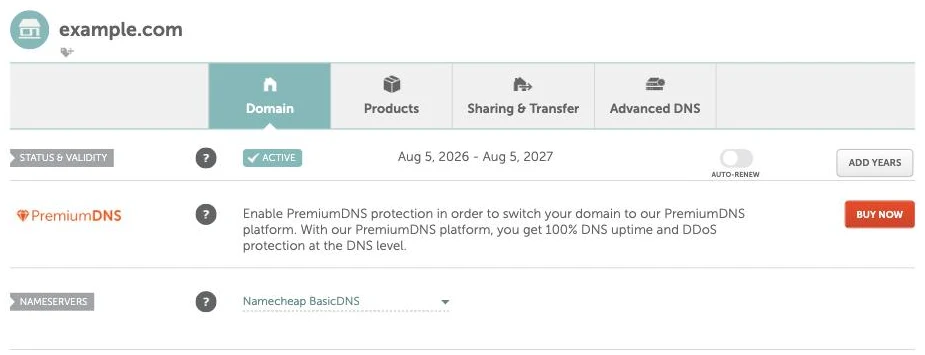
| Nameservers setting | Where your DNS records are edited |
|---|---|
| Namecheap BasicDNS (the default) | Advanced DNS tab, Host Records |
| Namecheap PremiumDNS | Advanced DNS tab, Host Records |
| Namecheap Web Hosting DNS | cPanel, Zone Editor |
| Custom DNS (Cloudflare, Vercel, your host...) | At that provider, not at Namecheap |
You can also check from outside the dashboard. BasicDNS domains answer from dns1.registrar-servers.com and dns2.registrar-servers.com:
dig +short NS example.com
dns1.registrar-servers.com.
dns2.registrar-servers.com.
If you see anything else, say ada.ns.cloudflare.com, your records live at Cloudflare and nothing you change in Namecheap's Host Records will be served. The DNS provider lookup does the same check in a browser and tells you where to go instead.
How to add a DNS record at Namecheap, step by step
- Sign in and open Domain List in the left sidebar.
- Click Manage next to the domain.
- Open the Advanced DNS tab.
- Under Host Records, click Add New Record. A blank row appears at the bottom of the table.
- Pick the Type. Namecheap pre-selects A Record, so change it if you need something else.
- Fill in Host (see the table in the next section) and Value.
- Leave TTL on Automatic unless you're planning a switch.
- Click the green checkmark at the end of the row. Until you do, nothing is saved. As soon as a new row is open, a Save All Changes button also appears under the table, for saving several rows at once.
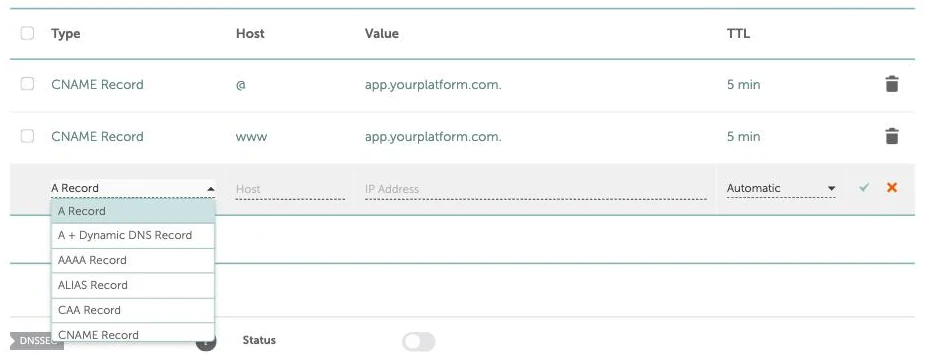
On a BasicDNS domain, the type dropdown offered exactly these, in this order: A Record, A + Dynamic DNS Record, AAAA Record, ALIAS Record, CAA Record, CNAME Record, NS Record, SRV Record, TXT Record, URL Redirect Record.
MX isn't in that list. Mail records have their own Mail Settings section further down the same page. It defaults to Email Forwarding, and you only get editable MX records after switching that dropdown to Custom MX. If you're setting up Google Workspace or another mail provider and can't find MX under Host Records, that's why.
Namecheap's published limits are generous enough that you won't hit them by hand: 800 records per domain, 60 characters in the Host field, and 2,500 characters in a TXT value. The TXT limit matters for long DKIM keys, which fit in one field here.
What to type in the Host field
The Host field is relative to your domain. Namecheap appends the domain for you, so you type only the part in front of it.
| You want the record at | Type in Host | Typical value |
|---|---|---|
example.com (the root) | @ | An IP for an A record, or a hostname for ALIAS |
www.example.com | www | A CNAME target, e.g. cname.yourhost.com |
app.example.com | app | A CNAME target |
shop.eu.example.com | shop.eu | A CNAME target |
_acme-challenge.example.com | _acme-challenge | A TXT verification string |
| Every subdomain not otherwise listed | * | Usually a CNAME or A record |
The common mistake is pasting the full hostname into Host. Namecheap's docs say to enter only the subdomain. If you did paste the full name, look it up afterwards with the CNAME lookup or the TXT record lookup to see which name it actually ended up on.
What Automatic TTL means on Namecheap
The TTL column is how long resolvers may cache the answer. Here's what the labels in the dashboard turned into on Namecheap's own nameservers:
| Dashboard label | Served as | Where I saw it |
|---|---|---|
| Automatic | 1800 seconds (30 minutes) | The SPF TXT record Email Forwarding creates |
| 5 min | 300 seconds | CNAME records on @ and www |
| (not editable) | 1800 seconds | The NS records at the top of the zone |
Namecheap documents ALIAS records as defaulting to 5 minutes. Automatic is fine for a record you set once. If you're about to point a live domain somewhere new, drop the old record to 5 min a day ahead so the switch lands within minutes instead of half an hour. The DNS TTL glossary entry has the full lowering procedure and each registrar's default.
The root domain: don't use a CNAME, even though Namecheap lets you
A CNAME record says "this name is an alias, go ask over there". The DNS spec (RFC 1034) doesn't allow a CNAME to share a name with any other record, and the root domain always has other records.
Namecheap's form doesn't stop you. This is a real domain in the account, with the domain and target renamed:
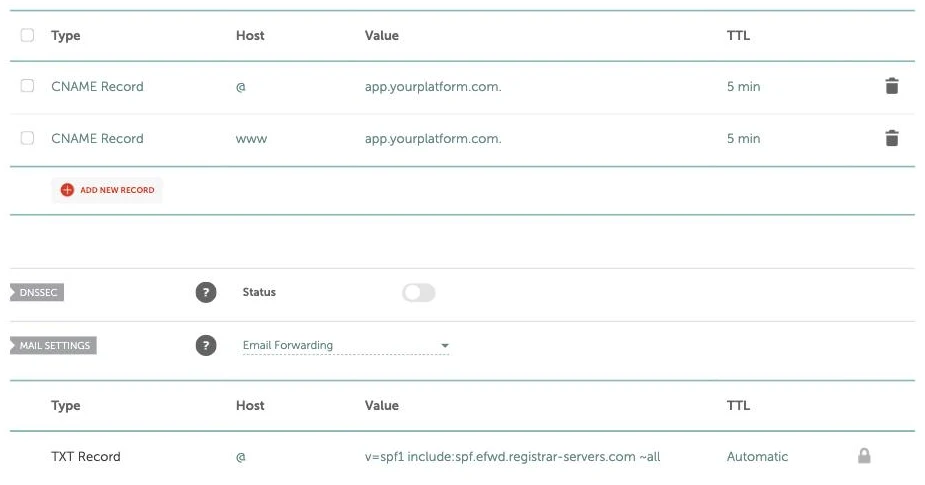
A CNAME on @ sits in Host Records while Email Forwarding keeps its own SPF TXT record, and five MX records, on that same @. Namecheap's nameservers answer with all of them:
dig +norec @dns1.registrar-servers.com example.com CNAME   ->  CNAME  target (TTL 300)
dig +norec @dns1.registrar-servers.com example.com MX      ->  5 MX records (TTL 1800)
dig +norec @dns1.registrar-servers.com example.com TXT     ->  "v=spf1 include:spf.efwd.registrar-servers.com ~all"
That is exactly the combination the spec forbids, and public resolvers don't agree on what to do with it. I asked each resolver for the A record first (which caches the CNAME), then immediately for MX and TXT. I ran that three times per resolver:
| Resolver | MX lookups that returned the MX records | TXT lookups that returned the SPF record |
|---|---|---|
| Cloudflare (1.1.1.1) | 3 of 3 | 3 of 3 |
| OpenDNS (208.67.222.222) | 3 of 3 | 3 of 3 |
| Google (8.8.8.8) | 2 of 3 | 3 of 3 |
| Quad9 (9.9.9.9) | 0 of 3 | 0 of 3 |
Quad9 answered every MX and TXT query with only the CNAME. A mail server using a resolver like that follows the alias, finds no MX record at the target, and under RFC 5321 falls back to delivering to the target's A record. That's your web host, which isn't running a mail server for you. And a receiving server that checks your SPF through that resolver finds no SPF record. So email to the domain fails for some senders and works for others, depending on which resolver they use, and that's about as hard to debug as a mail problem gets. Namecheap's own help article warns against a root CNAME for exactly this reason. The form still accepts one.
What to use on @ instead:
- A records. If the service gives you IP addresses, add one A record per IP with Host
@. They sit happily next to MX and TXT. - An ALIAS record. If the service only gives you a hostname, pick ALIAS Record from the type dropdown with Host
@. Namecheap resolves the target itself and answers with plain A records, so nothing on the root name is a CNAME. One trade-off: the answer is whatever address Namecheap got when it resolved the target, so a service that routes each visitor to a nearby region by DNS loses that at the root. The ALIAS record and CNAME flattening entries cover how that works under the hood. - Forward the root to www. If the site lives on
www, a URL Redirect Record on@pointing athttps://www.example.comsends visitors there. You can't also have an A or ALIAS record on@, since both want the same name.
Delete the parking records first
Namecheap sets up new domains for its parking page: a URL Redirect Record on @ pointing at http://www.yourdomain/, and a CNAME on www pointing at parkingpage.namecheap.com. Both use the same Host values you're about to use. Delete the default record with the matching Host (trash icon on the right) before adding yours, or the two will conflict on the same name.
How to change nameservers at Namecheap
Custom nameservers hand the whole domain's DNS to another provider. Do this when you've been told to "point your nameservers at" Cloudflare, Vercel or a hosting company, rather than add individual records.
- In Domain List, click Manage next to the domain.
- On the Domain tab, find the Nameservers row.
- Change the dropdown from Namecheap BasicDNS to Custom DNS.
- Enter each nameserver the provider gave you, one per line (Add Nameserver adds a row).
- Click the green checkmark to save.
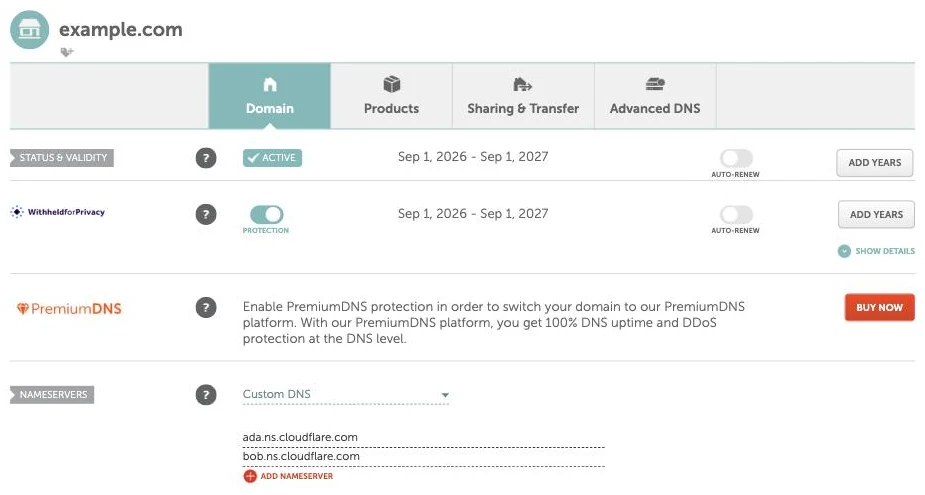
Copy your existing records first. The moment the registry points at the new nameservers, Namecheap's Host Records and Mail Settings stop being served. That includes the MX records your email depends on. Recreate them at the new provider before you save.
After the switch, Advanced DNS looks like this:
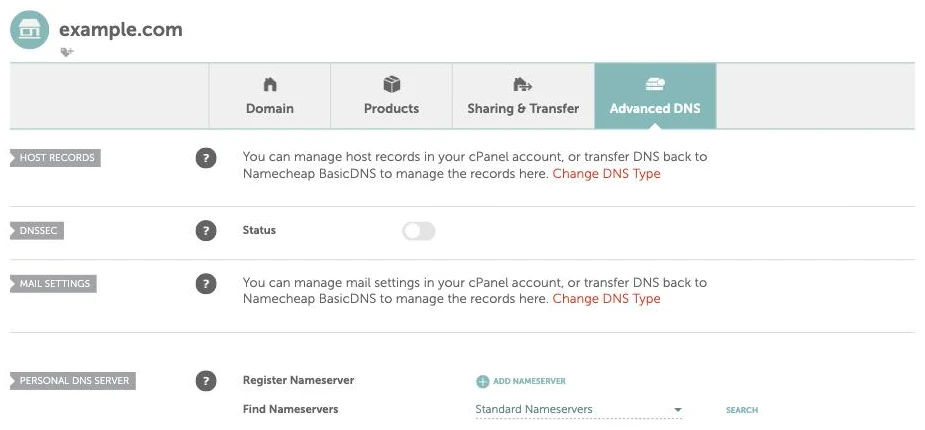
That domain's nameservers are Cloudflare's. The page still says "You can manage host records in your cPanel account", which is the generic wording Namecheap shows for every non-Namecheap DNS setup. Ignore the cPanel part. Your records are edited wherever the nameservers point.
How long a nameserver change takes
Record changes are limited by the record's TTL, so 5 to 30 minutes on Namecheap. Nameserver changes are slower, because part of the answer comes from the registry, not from Namecheap. Asking the registries directly on 14 September 2026, the delegation for a .com domain and for a .co.uk domain both carried a 172,800 second (48 hour) TTL. A resolver that cached the old delegation just before you saved can keep using the old nameservers for up to two days. That's where the familiar "24 to 48 hours" warning comes from. Most resolvers pick up the change far sooner. The DNS propagation checker shows which ones have.
Personal nameservers (ns1.yourdomain.com)
The Personal DNS Server section at the bottom of Advanced DNS is a different feature. It registers hostnames like ns1.yourdomain.com at the registry, with an IP you supply, so your own DNS server can use your brand name. It does not give you a DNS server. You still need one running at that IP, and Namecheap's docs point you to your hosting control panel to set up the matching A records. Before you go this way, white-label DNS measures how often vanity nameservers still reveal the provider behind them.
Check your work without waiting
Ask Namecheap's nameserver directly. It answers from the zone, not a cache, so a correct record shows up the moment you click the checkmark:
dig +norec @dns1.registrar-servers.com app.example.com CNAME
dig +norec @dns1.registrar-servers.com example.com TXT
If that's right but a website or a SaaS "Verify" button still says the record is missing, you're looking at a cache. And one cache here is easy to trip over:
Don't click Verify before you add the record. When a name doesn't exist, Namecheap's nameservers answer "no such name" along with their SOA record, and resolvers cache that negative answer for the SOA's TTL. On the BasicDNS zones I checked, that was 3,601 seconds. So if a verifier looks up app.example.com a minute before you create it, the resolver it uses can keep saying the name doesn't exist for just over an hour, however correct the record is. Add the record first, then verify. If you're already stuck, waiting it out works, and so does checking with a different resolver.
If you're connecting a domain to a SaaS app
Most apps that let you use your own domain ask for one of two things. For a subdomain like app.example.com, it's a CNAME with Host app. For the root domain, it's A records with Host @, or an ALIAS record if they only give a hostname. Everything above applies as written. The one mistake that costs real downtime is the root CNAME, because the form accepts it and the breakage only shows up in email, days later.
Domainee is a custom domains API for SaaS with a native MCP server, 20 domains and 100 GB free. I build it, so weigh this section accordingly. When one of your customers connects a domain, the connect flow looks up who runs their DNS. For Namecheap it shows the exact Host values from this guide, plus a warning to remove the parking records first. For the root domain it recommends A records and warns that a root CNAME only works where the provider emulates one. For the broader picture of what that flow has to handle across registrars, see how to connect custom domains to your SaaS.
FAQ
Where is Advanced DNS in Namecheap?
Sign in, open Domain List in the left sidebar, click Manage next to the domain, then click the Advanced DNS tab at the top of the domain page, next to Domain, Products and Sharing & Transfer. Host Records is the first table on that tab.
Why can't I see Host Records in Namecheap?
The domain isn't using Namecheap's DNS. When the Nameservers row on the Domain tab is set to Custom DNS, Advanced DNS replaces the Host Records table with a message about managing records elsewhere. Edit the records at whichever provider the nameservers belong to, or switch the dropdown back to Namecheap BasicDNS and recreate them there.
Can I add a CNAME record for the root domain on Namecheap?
The form accepts it, but don't. A CNAME on @ shares the name with your MX and TXT records, and I measured Quad9 answering MX and TXT lookups with only the CNAME, 3 out of 3 times. Use A records if the service gives you IPs, or an ALIAS record with Host @ if it gives you a hostname.
How long do Namecheap DNS changes take?
New or edited records show up on Namecheap's nameservers straight away. Cached copies elsewhere expire within the record's TTL: 30 minutes on Automatic, 5 minutes if you set 5 min. A "not found" answer cached before the record existed can last about an hour. Nameserver changes can take up to 48 hours, because registries publish the delegation with a two-day TTL.
How do I add an MX record on Namecheap?
MX records aren't under Host Records. Scroll down Advanced DNS to Mail Settings, change the dropdown from Email Forwarding to Custom MX, then add the MX rows your mail provider gives you with Host @.
What does @ mean in the Namecheap Host field?
@ is the root domain itself, example.com with nothing in front. Namecheap adds your domain to whatever you type in Host, so www becomes www.example.com and @ stays example.com.